
PRAXIS SCIENCE LAB / ANDROID
Prism Player — Publishing Materials
English listing, data inventory, graphics and release checks.
Preparation materials, not a submission or Google approval. Use these fields only for a verified release with the described functionality.
| Field | Prepared value / action |
|---|---|
| Title | Prism Player |
| Package | app.praxis.prism |
| Reviewed version | 0.1.0 (1) |
| Publisher | Praxis Science Lab |
| Support email | traiananghel@gmail.com |
| Suggested category | Music & Audio |
| App access | No login or restricted account access |
| Ads | Advertising planned; disabled in version 0.1.0. Only demo identifiers are configured. Intended banner placement: Style, while playback is paused. |
| Target audience and IARC | Answer from the real intended audience and final content. No age rating has been assigned here. |
| Health declaration | No health functionality in the reviewed scope; complete the form accurately |
English listing
Short description
Offline music, colorful themes, playlists, equalizer and a sleep timer.
Full description
Bring your own music to Prism Player, a colorful offline audio player for Android 9 and later. Choose local audio files or scan the music saved on your phone, then browse songs, artists, albums, genres and folders. Search your library and sort tracks by title, addition time or duration.
Create and reorder playlists, save favorites and browse recently added or most-played tracks. Manage the playback queue, shuffle, repeat, seek and adjust playback speed. Music can continue in the background with Android media controls.
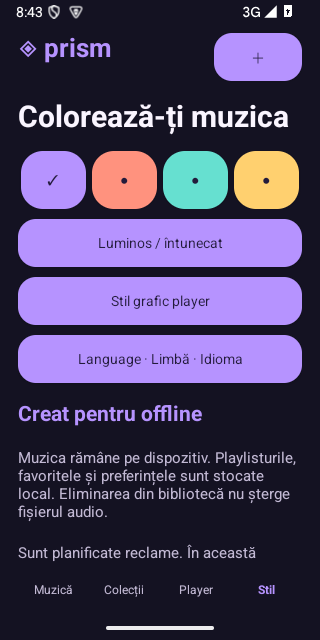
Shape Prism playback with the equalizer bands available on your device and bass adjustment where supported. Set a sleep timer to pause at the chosen time or after the current song finishes. Choose four color palettes, light or dark appearance and three geometric artwork styles; embedded album covers are also supported.
English, Romanian and Spanish are available. Your audio files stay on your device and no account is required. Music is not supplied with the app. Advertising is planned, but disabled in this development build; offline playback does not require watching an ad.
Data safety worksheet
Not finalized for production advertising. Google advertising libraries are included but disabled. Before activating ads, verify the exact signed artifact, SDK startup and data practices, consent configuration, privacy notice and all relevant Play declarations.
The app reads audio files selected through the Android document picker or made available by an optional music-library permission. Track locations and metadata, playlists, favorites, play counts, language and appearance preferences are stored locally. Embedded album artwork is read locally. Audio files and library records are not uploaded by Prism. There is no account, microphone recording or cloud music library.
Optional audio-library access is used for scanning: READ_MEDIA_AUDIO on Android 13 and later, or READ_EXTERNAL_STORAGE on earlier supported versions. The document picker can grant access to selected files without a library-wide permission. Media playback uses a foreground service, audio focus and a wake lock to support background listening and system controls. No microphone, location or all-files-management permission is requested. Internet and network-state permissions and Google Mobile Ads/UMP libraries are included for planned advertising, which is disabled in this build.
Media
Capture at least two authentic screenshots from the final app. Do not use simulated screens, synthetic medical fixtures or old-brand captures. Screenshot language must reflect the actual app; English captions do not imply an English-only interface.
Actual Android test-build captures, prepared for listing review. Recheck against the final upload build.
Remaining release checks
- Complete representative physical-device, Bluetooth, large-library and document-provider testing.
- Configure production AdMob and consent, and update privacy and Data safety information before enabling ads.
- Prepare final store artwork, screenshots and a release AAB signed with the upload key.
- Complete the applicable Google Play testing, declarations and review for the final artifact.