
PRAXIS SCIENCE LAB / ANDROID
GeoStamp Camera — Publishing Materials
English listing, data inventory, graphics and release checks.
Preparation materials, not a submission or Google approval. Use these fields only for a verified release with the described functionality.
| Field | Prepared value / action |
|---|---|
| Title | GeoStamp Camera |
| Package | app.praxis.geostamp |
| Reviewed version | 0.3.2 (5) |
| Publisher | Praxis Science Lab |
| Support email | traiananghel@gmail.com |
| Suggested category | Photography |
| App access | No login or restricted account access |
| Ads | Google test advertising is active in Albums, with UMP consent handling. No production ad identifiers or advertising revenue in development version 0.3.2. |
| Target audience and IARC | Answer from the real intended audience and final content. No age rating has been assigned here. |
| Health declaration | No health functionality in the reviewed scope; complete the form accurately |
English listing
Short description
GPS photo stamps, project albums, street maps and local PDF exports.
Full description
Give each photo a place and a purpose with GeoStamp Camera for Android 10 and later. Capture photos with coordinates, date, time, a project name and your own notes. Keep the original alongside a separately stamped copy. Import existing images using their own GPS and capture-date metadata when available.
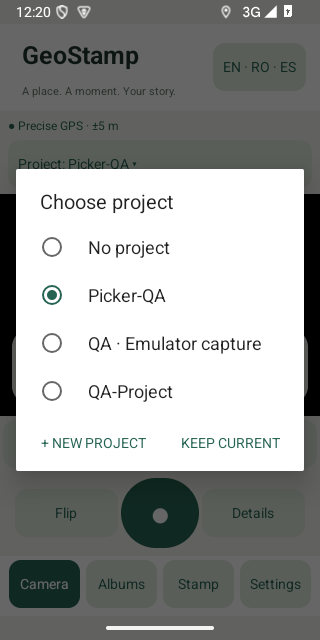
Choose the active project directly in Camera. After capture or import, pick an existing project or create a new one on the spot. Edit a saved stamp to change its project, note, colors, text size or placement while preserving the original capture coordinates and time.
Explore geotagged photos on OpenStreetMap street maps. Add a map thumbnail to a saved photo, or enable the visible automatic camera map: it is included when already loaded, without making the shutter wait for internet. New map areas require a connection.
Filter project albums, select photos for PDF export, share stamped copies and back up or restore albums with a ZIP file saved to a location you choose. GPS accuracy is shown in metres, with an optional wait for a more precise fix. Quick Help explains the main workflows.
English, Romanian and Spanish are available. No app account is required. The current development build uses Google test advertisements in Albums; production advertising and a Google Play release are still being prepared.
Data safety worksheet
Not finalized for a production release. Review Google advertising/consent SDK traffic, map requests, optional geocoding and user-directed file exports in the exact signed artifact. Reconcile provider practices, consent messages, the privacy policy and all active Play releases; do not declare that test ads or local photo storage imply no external data processing.
Original photos, stamped copies, coordinates, capture time, optional compass bearing, project names, place labels and notes are stored in private app storage. Language and stamp preferences are stored locally. GeoStamp does not automatically upload photographs or album records to a developer-operated server and has no app account.
Map tiles are cached locally. A saved photo can include a map thumbnail. Export, Android sharing and backup write copies to the destination or app you select. ZIP backups include original photographs, locations and project names, including empty projects; they are not encrypted by GeoStamp. A chosen cloud document provider or sharing app may transfer your selected files under its own practices.
Camera access is used to take photographs. Optional foreground location access supplies GPS coordinates while Camera is open; there is no background location tracking. Selected imports and backup files are accessed through Android document pickers. Exported stamped photos are written through Android MediaStore.
Internet and network-state access support OpenStreetMap maps, optional device geocoding and Google advertising/consent services. OpenStreetMap receives ordinary connection information and tile requests identifying the area being viewed. Optional address lookup sends coordinates to the device geocoding service; availability and provider practices depend on the device.
Google Mobile Ads Next-Gen and User Messaging Platform are active for test advertising in Albums. Test identifiers do not generate revenue and do not guarantee that no network or device information is processed. Google services may process connection/device information, identifiers, interactions and diagnostics according to SDK behavior and your choices. Advertising privacy options are available in Settings when the provider makes a form available. No ads are placed in the camera view.
Media
Capture at least two authentic screenshots from the final app. Do not use simulated screens, synthetic medical fixtures or old-brand captures. Screenshot language must reflect the actual app; English captions do not imply an English-only interface.
Actual Android test-build captures, prepared for listing review. Recheck against the final upload build.
Remaining release checks
- Complete representative physical-device camera, GPS, memory and document-provider testing.
- Configure production AdMob identifiers and consent, publish the final in-app privacy link and verify all SDK and Play declarations.
- Prepare release signing, final store graphics and authentic screenshots for the Google Play upload.
- Review map-provider capacity before broad distribution; the public tile service has no availability guarantee.